
SmileTalker Free1.4 - Google Play
You'll be able to see results in few seconds.
Publisher Description
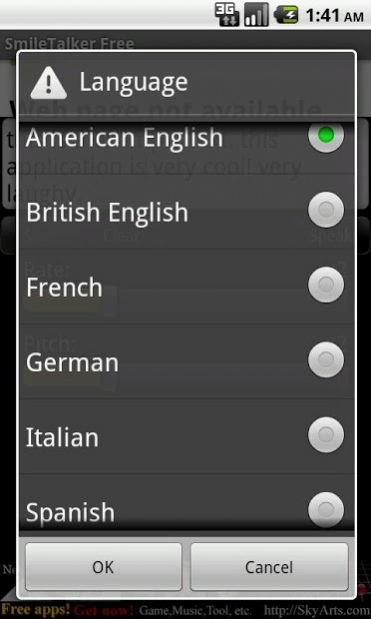
This application has Text-to-Speech function. Read an input text aloud.
Your terminal talks! Surely it will be it is fun, and to become the smile!
Can change a language, pitch, rate.
Can output a sound as a file.(Pay version only)
== How to use ==
Start reading aloud after having input a text into the text-input field of the screen upper part when you push the "Speak" button.
Stop reading aloud when you push it during reading aloud.
The "Clear" button clears the text which you input.
The "Save" button reads it aloud and stores a sound in an SD card as a file.
A store format is Wave format.
The store place is "/mnt/sdcard/skyarts.com/SmileTalker/" or "/sdcard/skyarts.com/SmileTalker/"(Android 1.x).
The "Rate" slider can coordinate a rate of the reading aloud.
The "Pitch" slider can coordinate a pitch of the reading aloud.
The "Language" menu can change a language to read aloud.
== How to enjoy ==
Will be fun just to let it read a sentence aloud.
However, it is a pleasure to let it say what you cannot usually say instead.
Or it may be a pleasure to send the audio file that you stored by an email.
== A reading aloud possibility language ==
The languages that reading aloud is possible are as follows.
* American English
* British English
* French
* German
* Italian
* Spanish
== About Japanese handling ==
Do not give a Japanese response to read it aloud.
However, you can let the Japanese style which an overseas person speaks by inputting a Romaji read it aloud.
Let you read various words aloud, and please develop a new way of enjoying!
== Initial setting ==
Use a Android's speech-engine for the reading aloud of the text.
It may be necessary to prepare for special data separately at the old terminals.
Open up a page of Android Market at the time of this application start when there are not necessary data(SpeechSynthesis Data).
Download data from this page, and please save it to an SD card.
When you confirm the installation status of necessary data in a setting screen of Android, finished with installation if a "Install voice data" item of "Speech synthesis" of the setting becomes disable.
In the case of enabled, you tap it, and please install it.
== More infomation ==
http://skyarts.com/products/android/smiletalker/
== About this free edition ==
We distribute "SmileTalker Free" of the free copy for the following purposes.
* To have you know the function of the pay version.
* For the person who cannot purchase a pay version.
For reasons of the above, do not change with a basically pay version other than the following things.
* There is an advertisement.
* A preservation function is not usable.
Please think about the purchase of the pay version when you can buy a pay version.
When an advertisement with the interest was displayed, the one that you cannot purchase taps an advertisement, and please display it.
Despite a free copy, the development is not free of charge. Because it is necessary to have you support a developer to use some contents, please cooperate.
== Attention for free edition ==
The advertisement communicates frequently, and it continues being displayed by a screen.
Please think about the purchase of the pay version when you think that an advertisement is obstructive.
In addition, the constructive comment to make application better welcomes you, but please refrain from the emotional, vulgar comment. ;-p)
About SmileTalker Free
The company that develops SmileTalker Free is SkyArts.com. The latest version released by its developer is 1.4.
To install SmileTalker Free on your Android device, just click the green Continue To App button above to start the installation process. The app is listed on our website since 2011-07-07 and was downloaded 0 times. We have already checked if the download link is safe, however for your own protection we recommend that you scan the downloaded app with your antivirus. Your antivirus may detect the SmileTalker Free as malware as malware if the download link to com.skyarts.android.smiletalkerfree is broken.
How to install SmileTalker Free on your Android device:
- Click on the Continue To App button on our website. This will redirect you to Google Play.
- Once the SmileTalker Free is shown in the Google Play listing of your Android device, you can start its download and installation. Tap on the Install button located below the search bar and to the right of the app icon.
- A pop-up window with the permissions required by SmileTalker Free will be shown. Click on Accept to continue the process.
- SmileTalker Free will be downloaded onto your device, displaying a progress. Once the download completes, the installation will start and you'll get a notification after the installation is finished.
Program Details
System requirements
Download information
Pricing
Version History
version 1.4
posted on 2011-07-07
version 1.4
posted on 2011-07-06
Several fixes and updates
Disclaimer
Official Google Play Link
We do not host SmileTalker Free on our servers. We did not scan it for viruses, adware, spyware or other type of malware. This app is hosted by Google and passed their terms and conditions to be listed there. We recommend caution when installing it.
The Google Play link for SmileTalker Free is provided to you by apps112.com without any warranties, representations or guarantees of any kind, so access it at your own risk.
If you have questions regarding this particular app contact the publisher directly. For questions about the functionalities of apps112.com contact us.
